"Not only is the software completely user friendly, the program is adaptable and versatile, and by far some of the best support I have ever encountered"

Mariana Gomez
Scheduling Manager,
Global Safety & Security
Service Management References

Service Software Benefits

  • Increase Profits - Optimize Scheduling and maximize time in the field
  • Save Time and Money - Reduce paperwork and errors with automation
  • Increase Customer Satisfaction - Respond faster and more accurately to Customer needs
  • Ease of Management - One software application to manage Customers, Jobs, Scheduling and Accounting
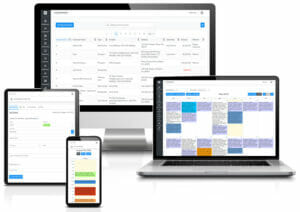
  • Real-time Secure Access - Securely access your data from any computer, laptop, smartphone, or tablet

Field Service Software Features

Easy to use web-based service software designed to help you manage your business more efficiently. We manage the hardware and software for you which creates time to focus on directing your business increasing productivity, sales, and profits.

Login from any computer, laptop, smartphone or tablet such as iPad and Android to easily manage Schedules, Customers, Jobs, Employees, Vendors, Invoicing, Accounting, Equipment and more.

Job Management

  • Easily create and manage Jobs at every stage from Estimate to Closed. Update Jobs from the office or field. Job dashboard gives you a real-time view into your business.

  • Customizable Work Order Form

    Customize the Work Order to match your current form or use our standard template.

  • Custom Fields

    Easily create custom fields to display on the Job page.

  • Maintenance and Service Contracts

    Easily manage Maintenance and Service Contracts for providing and tracking continued service and maintenance to your Customers.

  • Emailing Customers

    Email Estimates, Work Orders, and Invoices directly to your Customer. This may be done from the office or field with a laptop, smartphone, iPad or Android tablet.

  • Text Alerts for Dispatch

    Quickly Send a text alert or email the Work Order to the assigned Employee, Subcontractor, or Crew for emergency dispatch.

  • Recurring Appointments

    Easily schedule recurring Job appointments on a daily, weekly, monthly or yearly frequency. Easily edit the entire series or one occurrence.

  • Mapping

    Easily view and print driving directions to service locations with a link to Google Maps. No additional mapping software is needed to purchase and integrate.

  • Job Status Tracking

    Create custom Job Status' to match your current business process. Job dashboard and reporting give you a real-time view into your business.

  • Attachments

    Upload attachments to each Job and Customer such as photos, spreadsheets, and contracts.

Scheduling Optimization

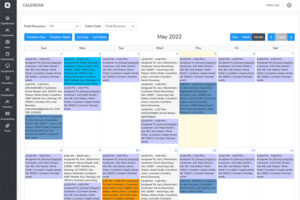
  • Quickly schedule new Jobs and update existing Jobs directly on the Calendar. Update Job appointments easily with drag and drop capability.

  • Calendar Views

    Quickly view schedules for Employees, Subcontractors, and Crews in the Day, 5 Day, 7 Day, Week, or Month view.

  • Field Resource View

    Easily filter the calendar by an Employee, Subcontractor, or Crew. Schedule by viewing the availability of an individual Field Resource or by an available date and time.

  • Color Coded Calendar

    Assign custom color codes to Employees, Subcontractors, Location Zones, and Job Status' for quick and easy visual scheduling optimization.

  • Schedule Summary

    Quickly print a Day or Week Schedule Summary for an Employee, Subcontractor, or Crew.

  • Recurring Appointments

    Easily schedule recurring Job appointments on a daily, weekly, monthly or yearly frequency. Quickly edit the entire series or one occurrence.

  • Crew Management

    Easily create Crews to assign to Jobs. Crew Members may be updated at any time.

  • Text and Email Alerts

    Send Job text or email alerts to the assigned Employee, Subcontractor, or Crew.

CRM

  • Easily manage all communications, notes, Jobs, contacts, locations, and equipment. Securely access data anytime, anywhere from any computer, laptop, smartphone, or tablet.

  • Customer Search

    Quickly and easily search for Customers by name, address, zip code, phone number, or contact.

  • Custom Fields

    Easily create custom fields to display on the Customer page.

  • Customizable Page

    Create a custom page for each Customer type. For example, select different data fields to display for Commercial and Residential Customers.

  • Portal Access

    Give your Clients online access to request a Job, view open Jobs, History, and more. You control the level of access and greatly improve satisfaction.

  • Account Manager

    Assign an "Account Manager" to each Customer. The Customer List and Job List may be sorted by Account Manager.

  • Job History

    Quickly view history of all activity for each Customer, Contact, Location, Jobs, Equipment, Invoices, and more.

  • Multiple Contacts and Locations

    Easily create multiple locations and contacts for each Customer. When creating a Job easily select the location and contact to provide service.

  • Parent / Subsidiary

    Create parent hierarchy to easily manage Customers with subsidiaries.

  • Equipment

    Track make, model, and serial number along with full service history and warranty information. Equipment details and service history included on Work Order.

  • Billing / Invoicing

    Quickly create invoices. Easily track open invoices to avoid missed payments.

  • Customizable Invoice Form

    Customize the Invoice to match your current form or use our standard template.

  • Export to QuickBooks

    Easily export your invoices to QuickBooks or use our Accounting features.

  • Attachments

    Upload attachments to each Customer and Job such as photos, spreadsheets, and contracts.

Estimates (Proposals)

  • Easily create and track Estimates to determine where to spend your efforts and maximize sales. One click converts an Estimate into a Work Order.

  • Onsite Estimates

    Create Estimates while onsite with your prospects using any laptop, smartphone, or tablet such as an iPad, Android, Windows 7, and Blackberry.

  • Customizable Estimate Form

    Customize the Estimate to match your current form or use our standard template.

Reporting

  • Robust reporting capabilities for all data. Customize each report to view real time data critical to run your business. All list have custom report capabilities.

  • Job Reports

    Easily create custom Job reports for a real-time view into your business. Generate payroll, time sheets, Job profit, and more.

  • Customer Reports

    Easily generate custom Customer reports for marketing statistics, lead generation, revenue generation and more.

  • Marketing Reports

    Run marketing reports to determine where you're receiving the best return on your marketing spend.

  • Payroll

    Easily generate payroll reports for Employees and Subcontractors.

  • Time sheets

    Easily create time sheets for Employees and Subcontractors.

  • Accounting Reports

    Generate invoice reports, transaction reports and more.

Mobile Access

  • Real-time access to your data from any computer, laptop, smartphone, or tablet such as iPad and Androids. Update data in real-time from the office, field or home.

  • iPad, and Android Compatible

    Real-time access from on your iPad and Android tablets with full functionality.

  • Mobile Phone Access

    Real-time access with full fuctionality from on your iPhone, Android, and Windows smartphone.

Customization

  • Customizable Terms

    Customize terms such as Job Status, Customer Type, and Location Zone to match your current business eliminating the need to change the way you do business.

  • Customizable Customer Page

    Customize the page for each "Customer Type". For example, select different data fields to display for Commercial and Residential Customers.

  • Customizable Data Fields

    Easily create custom data fields for the Customer and Job page.

  • Custom Forms

    Customize the Estimate, Work Order, and Invoice form with your company logo, terms and conditions, signature line, and much more. Create forms to meet your needs.

  • ID's

    Customer, Location, and Equipment ID's are customizable with numbers, characters, or symbols.

  • Time Zones

    Schedule across time zones. Each User has the option to set their time zone.

Billing / Accounting

  • Accounting features to help you manage your business. Easily create Invoices to bill your Customers upon completion or partial completion of Jobs for immediate payment. Bella has the capability to easily track open, outstanding, and paid invoices. Never miss a payment again!

  • Job Profit

    Service, Inventory Parts, and Non-inventory Parts have a "Cost" field. Update costs as needed and instantly see the Job Profit! Profit is automatically calculated and displayed in the Items section of the Job page.

  • Item List

    Items include Service, Inventory Parts, Non-inventory Parts, Other Charges, Discounts, and Sales Tax. The Item List is managed under the Accounting or Admin tab. Items are used to create an Estimate, Work Order, or Invoices.

  • Chart of Accounts

    Create your Chart of Accounts to manage your business. You have the ability to assign each Item to an account to better track your your Income and Expenses. Use Bella's Accounting features or export transactions to QuickBooks or other accounting software if you prefer.

  • Price Levels

    Assign a Price Level to a Customer and only the selected Items will display when creating an Estimate, Work Order, or Invoice for that Customer. Also, if you have created a Customer Portal for that Customer and gave them access to your Items List, only the selected Items for that Customer will be displayed.

  • QuickBooks Integration

    Bella Solutions is compatible with QuickBooks. Export your invoices to a file format compatible for use with QuickBooks and other accounting software. This allows you to create and track an Invoice with QuickBooks or another application if you prefer.

Employee and Vendor Management

  • Easily create a list of Employees and Vendors for your business. Employees and Vendors may be assigned Jobs.

  • Employee Equipment

    Track equipment such as tools, trucks, and laptops that was assigned to an Employee and when it was returned.

  • To do’s

    Easily assign To do’s. A priority for the To do can be set at low, medium, or high for quicker responses.

  • Personal Dashboard

    The "My Home" page is unique to each User and only displays their assigned Jobs and To do's. The home page is designed to help each User manage their schedule.

Data Security

  • Be assured your data is secure using the latest in firewall, encryption, and intrusion detection technologies. Your data is continually backed up in case of any situation that may arise in which you need to have it restored.

  • User Roles

    Assign User Roles to give you complete control over what each Employee and Vendors have rights and permissions to view and access.

  • Admin User Access

    Admin Users have access to all areas of the software. There may be more than one Admin User for your account.

  • Standard User Access

    Admin Users may set the access levels for each Standard User. Standard Users may be given view only or edit access to specific areas of the software. Settings may be modified at any time by an Admin User.